How to Book and Manage Coaching Sessions

Updated: May 19
How to effectively book, reschedule, and manage your coaching sessions on the Coached by Beverley website.
If you have any questions, issues booking, or would like me to book, cancel or reschedule your session for you, please contact me on beverley@coachedbybeverley.co.uk
How to book a single session or purchase a package
On the homepage, under the Coaching Pathways menu bar, click the service you would like to book:

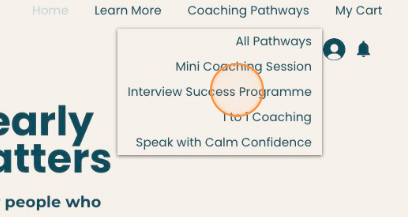
Scroll down to the bottom of the page where you'll see the calendar
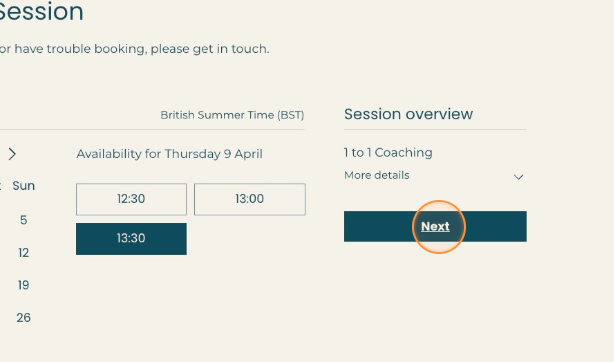
Find the date and time that suits you. If you can't find a time that suits you, contact me on beverley@coachedbybeverley.co.uk and we'll find something

Important:
If you are not based in the UK, you can change your calendar view to your local time by clicking the arrow next to British Summer Time (BST) or Greenwich Mean Time (GMT).
It may have done this automatically for you, so check the timezone before booking

Click "Next"
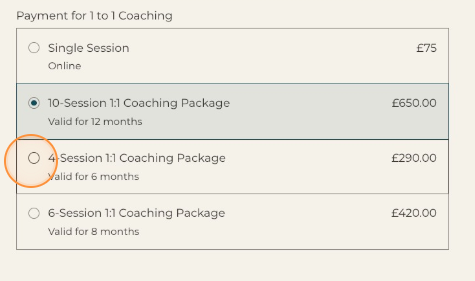
Choose whether you want to purchase a single session or buy a package

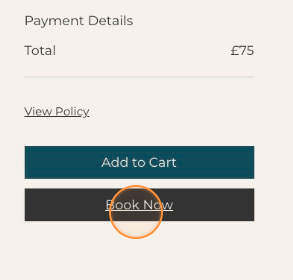
Select "Book Now" for single sessions or "Buy a plan" for packages

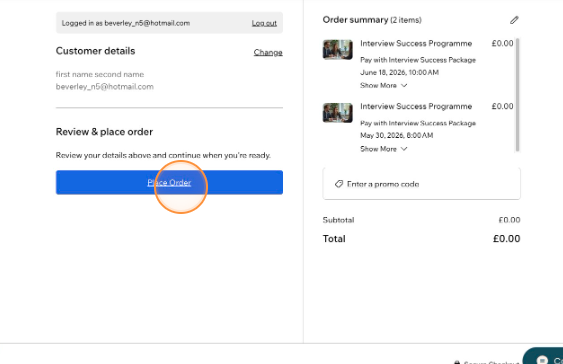
Complete your details on the checkout page, click "Save & Continue", and then "Place Order"

Important:
If you purchase a plan (not a single lesson), your payment has gone through but to secure the slot you reserved on the calendar, you will need to click "Complete Your Booking". If you exit at this screen, you will not reserve your booking

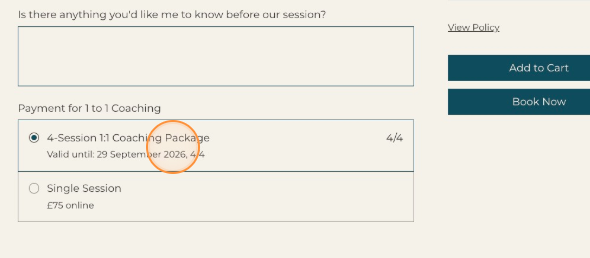
When you continue, you will then see the booking page again. This time, select the option to pay using your plan, and click "Book Now"

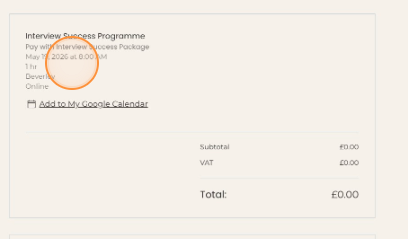
You will then see the confirmation page
If you want to book more sessions in the plan, click "Continue Browsing"

You will be directed to the All Pathways page. Scroll to the service you have purchased and click "Learn More"
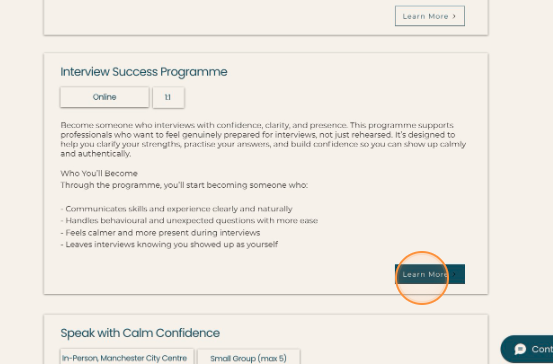
Repeat from step 2 - scroll down to the calendar, find a time and date that works for you, and click through to book.
If you have any questions, issues booking, or would like me to book, cancel or reschedule your session for you, please contact me on beverley@coachedbybeverley.co.uk
How to join your session from the Coached by Beverley website
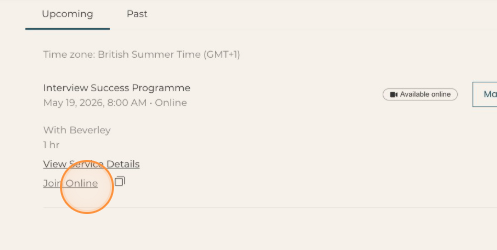
On the homepage, under your log-in menu, click "My Bookings"


Click the arrow next to the session booking

Click "Join Online"
How to book another session in your package
On the homepage, under your log-in menu, click "My Bookings"
Click "Manage" next to the session booking
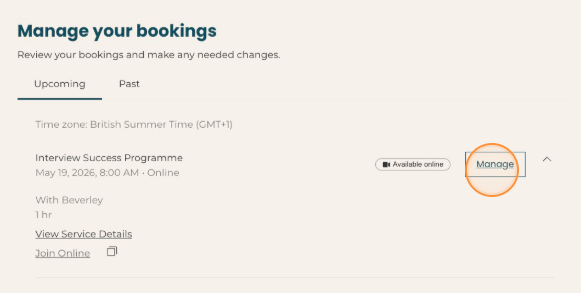
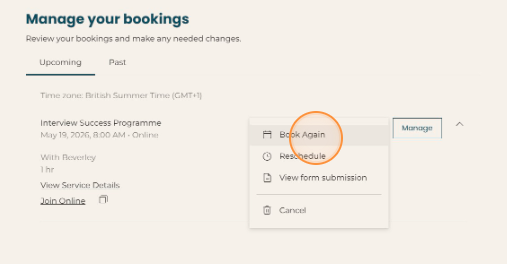
Click "Book Again" and find a suitable time to book, following the same steps you followed when booking your first session

Please note, you can only book sessions 60 days in advance. If you would like to book past this date, please contact me on beverley@coachedbybeverley.co.uk
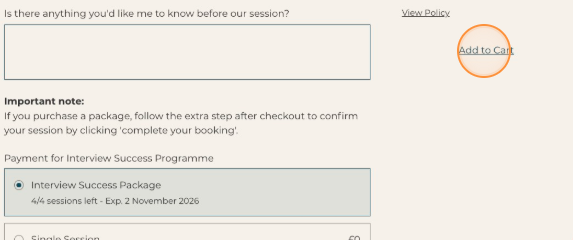
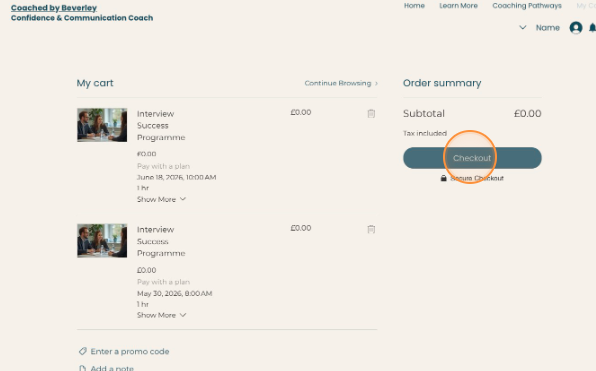
You can also book multiple sessions at the same time by clicking "Add to Cart" and selecting a suitable time and date

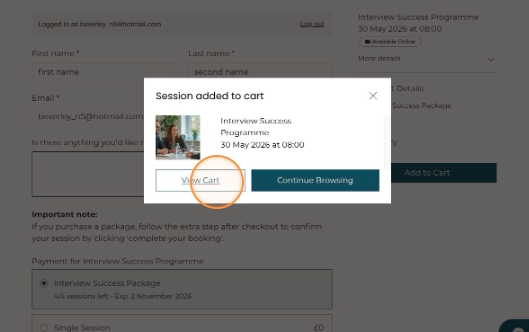
When you have selected all the times and dates you want to book, click "View Cart"
Select "Checkout" and "Place Order"
How to reschedule your session
On the homepage, under your log-in menu, click "My Bookings"
Click "Manage" next to the session booking
Click "Reschedule". Please note you can only do this up to 24 hours before the session.

Find a suitable time and click "Reschedule"


Confirm to reschedule your booking

How to cancel your session
On the homepage, under your log-in menu, click "My Bookings"
Click "Manage" next to the session booking
Click "Cancel". Please note you can only do this up to 24 hours before the session.
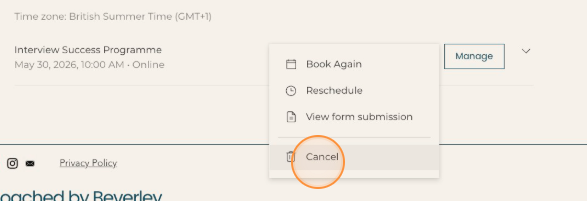
You can also reschedule your booking and find an alternative time

Confirm to Cancel your booking. This wil be returned to you as a credit and you can rebook for a suitable time.

Booking & Cancellation Policy
1. Booking & Payment
All coaching sessions must be paid for in advance.
You can purchase either:
Single sessions, booked individually
Coaching packages, which allow multiple sessions to be booked over time
Sessions can be booked at times that suit you, subject to availability.
2. Session Validity & Expiry
All individual sessions and packages must be taken within the specified timeframe, starting from the date of purchase.
Any unused sessions after this period will be forfeited and cannot be refunded. Extensions may be considered in exceptional circumstances at the coach's discretion.
3. Rescheduling & Cancellations
If you need to change a session:
More than 24 hours’ before a session: You may reschedule your session or receive session credit to use at a later date.
Less than 24 hours’ before a session: The session will be considered used and cannot be rescheduled or credited.
This policy protects reserved session time that cannot usually be filled at short notice.
4. Refunds & Credits
If you cancel with more than 24 hours' notice, your session will be returned as credit, which can be:
Used for a future session
Transferred to another person
Applied toward another coaching service
Refunds will only be issued where required by law or if the coach cancels a session and an alternative time cannot be agreed.
Once a package has started, refunds are not available for unused sessions. However, unused sessions may be transferred to another person within the validity period.
5. Cooling-Off Period (Online Purchases)
If you purchase coaching services online, you have the right to cancel within 14 days of purchase.
However, if you book and attend a session within this period, you acknowledge that the service has begun and your right to cancel may be reduced or lost once sessions have been delivered.
6. Commitment & Confidentiality
Coaching is a collaborative process, and results depend on your engagement and commitment during and between sessions.
All information shared during coaching sessions is treated as confidential unless disclosure is required by law or there is a risk of harm.


Comments